

This post may contain affiliate links that at no additional cost to you, we may earn a small commission. Read the Disclosure Policy for more information.
Last Updated on October 12, 2026 by Katie
Four days of silence, then eleven pins in one sitting because I’d felt guilty.
That was my Pinterest “strategy” for a good while: pin when I remembered, usually from the sofa here in the UK, usually around the time my American audience was fast asleep.
I blamed the pins. I redesigned them, rewrote descriptions, and fiddled with fonts like it was a hobby. Traffic stayed flat.
The actual problem was embarrassingly simple. When I finally checked my audience stats, most of my readers were in the USA, and I’d been pinning into the void.
Once I started pinning around when they were actually scrolling, my engagement and traffic started to climb.
Timing isn’t magic. But like plenty of things in life, turning up when people are around helps.
In this post I’ll walk you through the best time to post on Pinterest, how to adjust it for your own audience, and the mistakes I’d skip if I could do it again.
If you’re new to the platform, my guide on how to get started with Pinterest covers the basics first.
Why the Best Time to Post on Pinterest Still Matters
Years ago, Pinterest showed pins in the order they were posted, so timing was basically the whole game.
That’s no longer the case, which makes it fair to wonder whether the clock still matters.
It does, and the reason is reach. Getting the best time to post on Pinterest right gives every pin a fair start.
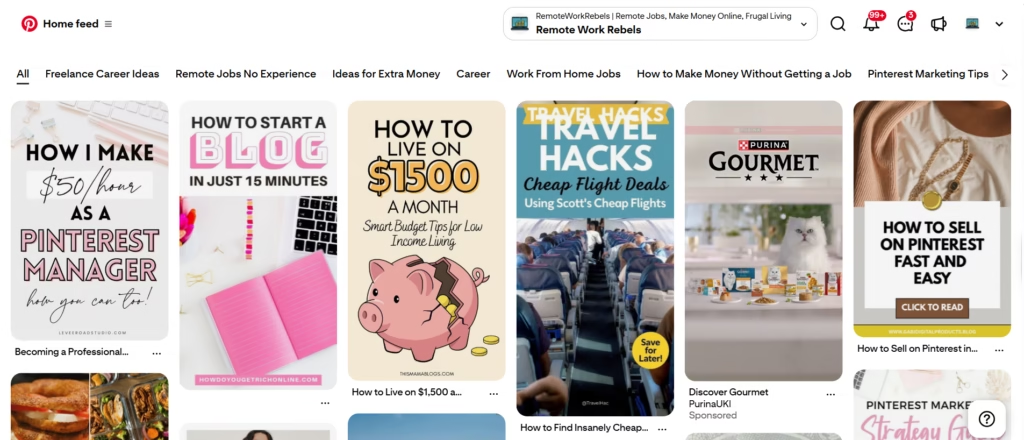
How the Pinterest Algorithm Reads Your Pins
Pinterest watches what happens right after a pin goes live.
Early saves, clicks and comments work like votes of confidence, and the more of them a pin collects, the more people Pinterest shows it to.
A pin that gets nothing is treated as one nobody wants, and it gets shown to fewer people.
What Pinterest can’t see is why it got nothing. It doesn’t know your pin went live at 3am for your readers. It just sees silence.
That was exactly my problem. My pins were landing while most of my readers were offline, so they got no early reactions, so Pinterest had little reason to push them. Same pins, same designs. Different clock.
Timing isn’t everything, mind you. Pins last far longer on Pinterest than a post does on most platforms.
One of mine is four years old and still sends me over 1,100 blog visits a month, which I wrote about in the benefits of using Pinterest. Good timing just helps a pin get off the ground.
Your Audience Has Habits (Use Them)
People don’t scroll Pinterest at random. Some browse on their commute, some on a lunch break, and plenty save recipes and project ideas on the sofa once the kids are in bed.
Weekday habits look different to weekend ones, and your readers have a routine of their own.
A well-timed pin turns up when people are already browsing, which makes a save or a click much more likely. A badly timed one sits there waiting for someone to wake up.
It also saves you guessing. Once you know when your audience is around, you stop wondering whether the pin or the posting time is at fault.
Pro tip: before you change anything, check where your audience actually is. A schedule built around the wrong time zone is just a tidier version of pinning randomly.
When Is the Best Time to Post on Pinterest?
Most of the research on the best time to post on Pinterest points the same way: evenings, particularly between 8pm and 11pm, with Fridays and Saturdays often coming out ahead and 9pm cited as the busiest hour.
A smaller spike turns up in the early hours of the morning as well.
Treat that as a rough guide, not a rule. It describes Pinterest users in general, and your audience isn’t “users in general”. (I found that out the hard way.)
Check Where Your Audience Is First
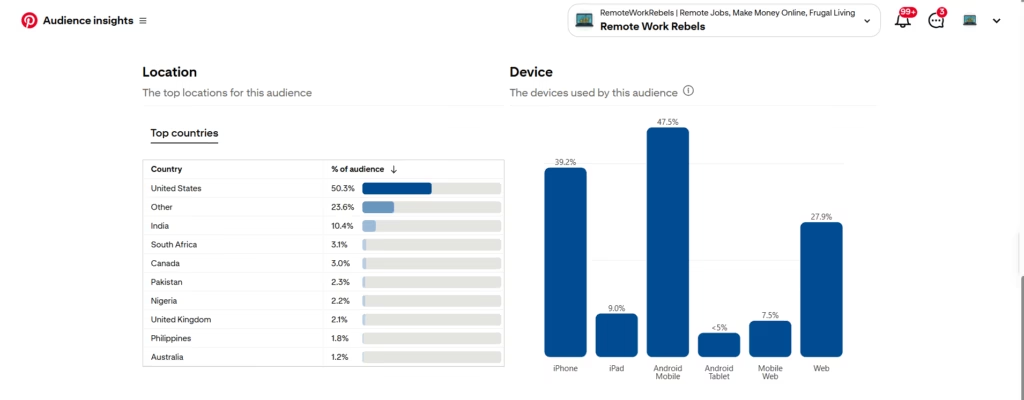
Before you look at a single time slot, work out where your audience lives. The best time to post on Pinterest is always measured in your audience’s time, not yours.
This is the mistake I made for months. I’m in the UK, my audience is mostly in the USA, and I was pinning at times that looked sensible on my own clock.
When you’re in the UK and your readers are in America, 8pm for them is not 8pm for you. It’s the middle of the night over here.
So if you want to post at 8pm, that means 8pm USA time, not UK time.
The gap is roughly five hours between the UK and the US East Coast, and about eight to the West Coast. That makes 8pm Eastern around 1am in the UK, and 8pm Pacific around 4am. Not exactly sofa-and-a-cuppa hours.
The same applies whichever way round it is. If your audience is in the UK and you’re sitting in the USA, you’re the one doing the maths.
Dig into your Pinterest analytics to see where your viewers are based, then convert every time in this post into their time zone before you schedule anything.
Pinterest’s own guide to Audience Insights is a good place to start, since it shows what your audience cares about and how to find it in your business account.
One more trap: the UK and the US change their clocks on different dates, so for a couple of weeks each spring and autumn the gap shifts by an hour.
If your numbers suddenly look off, check that first.
Best Time to Post on Pinterest, Day by Day
If you’d like a concrete starting point, here are the three strongest slots for each day. Read them as your audience’s local time.
| Day | Best time | Next best |
|---|---|---|
| Sunday | 8pm | 12pm, 9pm |
| Monday | 8pm | 4pm, 2pm |
| Tuesday | 8pm | 9pm, 3pm |
| Wednesday | 2pm | 4pm, 3pm |
| Thursday | 8pm | 2pm, 6pm |
| Friday | 4pm | 3pm, 2pm |
| Saturday | 11pm | 6pm, 7pm |
Notice how often 8pm tops the list. It wins on four days out of seven, so if you only have the patience to test one slot, start there.
What About Video Pins?

The best time to post on Pinterest for video pins follows a slightly different pattern.
On weekdays, mornings from around 8am to 11am and afternoons from 2pm to 4pm tend to work, when people steal a scroll between tasks.
Evenings after 8pm are strong too, as people wind down. At weekends, it’s a gentler rhythm: late morning, then a window in the early evening.
Whichever slots you pick, give them a few weeks before judging. One good Tuesday proves nothing.
Pro tip: treat these times as your first experiment, not your final answer.
Pick two or three slots, convert them to your audience’s time zone, pin consistently, and check your analytics after a few weeks to see which ones they respond to.
What to Weigh Up Before You Set Your Best Time to Post on Pinterest
The table above gives you somewhere to start. These four things decide where you end up.
What You Want Pinterest to Do for You
Your goal changes your schedule. If you’re after followers and visibility, aim for the hours your audience is busiest, because that’s when a pin picks up the most early reactions.
If you want clicks to your blog or shop, think about when people have a few spare minutes to actually read, which is a different mood from idle scrolling.
I can’t give you the exact clock time that suits your goal, and nobody else can either.
If traffic is what you’re after, test a few different slots and compare your clicks, not just your impressions. A pin can get plenty of views and still send nobody anywhere.
Which Days Suit Your Audience
The best day for one account can be the worst for another.
Weekdays tend to catch people on breaks and commutes, while weekends often suit audiences with time to browse and plan.
What matters is your readers’ routine. If they work 9 to 5, weekday lunchtimes and evenings are a decent bet.
If you pin hobby or lifestyle content, weekends may do more of the heavy lifting.
My own audience is mostly people trying to escape the 9 to 5, which makes me suspect evenings do well, but I’d rather you check your numbers than take my word for it.
How Often to Pin
This is where I used to go wrong. Pinterest rewards a steady rhythm, and mine was the opposite: nothing for days, then a pile of pins in one go.
Pin too rarely and you slip out of sight. Pin too much and you risk wearing out the people following you.
There’s no magic number, so pick a pace you can keep up for months, not one you’ll abandon by week three.
The easiest way to stay steady is to schedule pins ahead instead of relying on your memory. Batch them in one sitting and let them go out at the times you’ve chosen.
Who Your Audience Actually Is
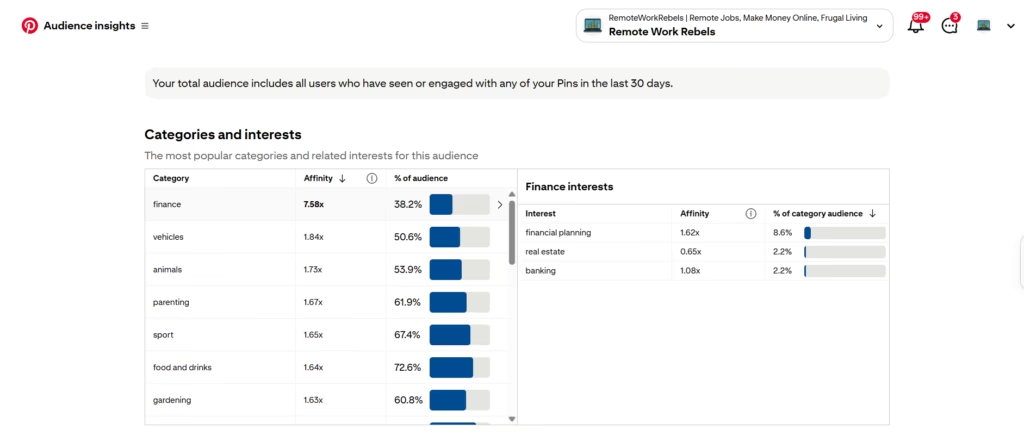
This one mattered most for me. We’ve covered time zones, but your audience’s daily life counts too.
What do they do for work? When do they get downtime? What are they interested in?
A reader with a day job is on Pinterest at different moments from a stay-at-home parent or a student. If you don’t know, your analytics will hint at it, and it helps to look at who engages with your pins.
Pro tip: if you’re stuck, pick the three times from the table that best suit your audience’s routine, test them for a few weeks, then keep what works and drop what doesn’t.
How a Pinterest Manager Can Help Boost Your Pinterest Reach

There’s no single best time to post on Pinterest. The right slot depends on where your audience lives, what their days look like, and whether you show up consistently.
That sounds simple until you try to fit it around everything else on your plate.
Working out your audience’s time zone, testing slots, keeping an eye on analytics, designing fresh pins and posting regularly is a lot to keep up with.
It’s also the kind of work that slides when life gets busy. I know because it slid for me. Four days of nothing, then a panic pile of pins.
That’s where a Pinterest manager comes in.
What a Pinterest Manager Actually Does
A good one takes the repetitive, easy-to-forget parts off your plate:
- Works out the right posting times for your audience, including the time zone maths, so you’re not pinning into the middle of their night
- Designs and schedules fresh pins from content you’ve already published, so you don’t have to keep producing new material just to feed Pinterest
- Keeps your posting steady, with a small number of carefully optimised pins a day instead of a burst followed by silence
- Checks your analytics and adjusts as results come in, since the best times for your account can shift
The goal is that Pinterest quietly sends visitors to your site while you get on with the parts of your business you actually enjoy.
What to Look for Before You Hire One
Be a little sceptical, because this field has its share of overpromisers.
Ask how they schedule. Some managers lean heavily on automation tools and looping old content, which can backfire as Pinterest has become stricter about repetitive posting.
I schedule everything through Pinterest’s own native tools instead. It’s more hands-on work, but it’s what performs well now.
Ask about volume too. More pins isn’t automatically better, and flooding an account can look like spam.
A handful of fresh, well-optimised pins a day builds momentum more safely.
And be wary of anyone who guarantees sales. I won’t, and neither should anyone else. A manager can bring you more visibility and more targeted traffic.
What visitors do once they land on your site depends on your offer and your pages.
Work With Me on Your Pinterest
I’ve spent over six years growing my own blog’s traffic through Pinterest, including plenty of mistakes with timing along the way, so I know how much a few small changes can move the numbers.
If you’d like help, my monthly management packages cover custom pin creation and scheduling, keyword optimisation, a growth strategy for your account, and monthly reporting.
Every package starts with a free account audit, and there’s no long-term contract.
You can see everything, including pricing and answers to common questions, on my Pinterest management page.
#Time #Post #Pinterest